Any song you own, turned into a bass lesson you can play.

BassRack’s AI isolates the bass from any song, turns it into a chart you can play and listens to your real bass while you play along. Every note scored, at your speed, at your level.

Runs in your browser. Your library stays on your device.

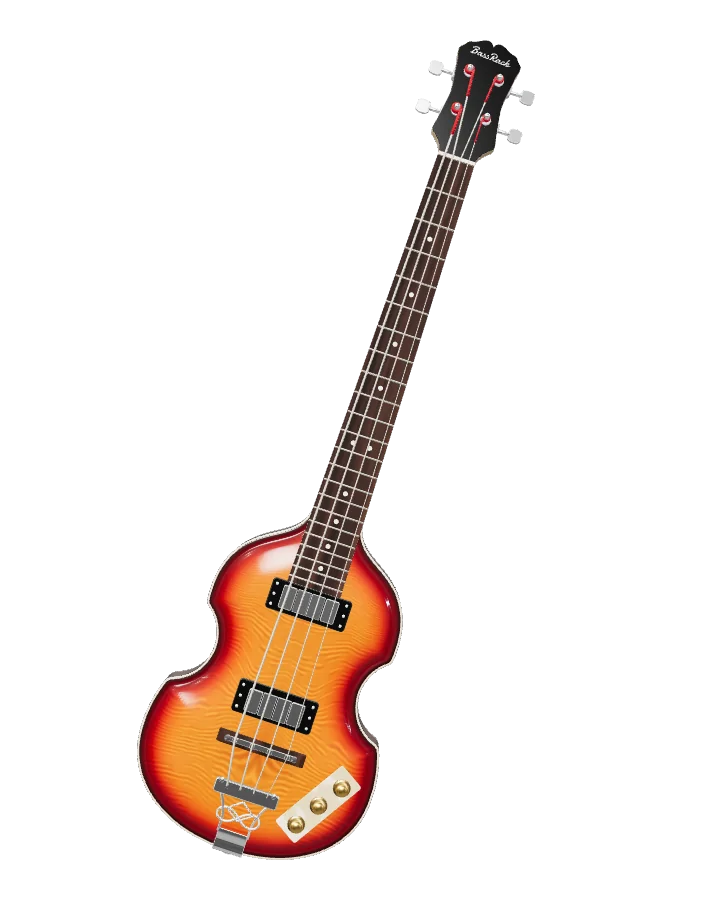
An electric bass with "BassRack" on the headstock.
How it works

From a song to a scored practice session

Processing happens once per song. After that, opening it is instant.

  1. 01

    Bring a song

    Drop an audio file you own into the cassette deck (mp3, wav, flac and more). With the free, optional tuner helper you can also bring songs in from a link. Use only audio you own or have the right to use.

  2. 02

    The bass is isolated

    BassRack’s AI pulls the bass out of the mix, so you can hear it on its own or play along with the rest of the band.

  3. 03

    You get a chart you can play

    The bass line becomes notes with string and fret numbers, in time with the song and laid out to sit comfortably under your hand.

  4. 04

    You stay in control

    Notes worth a check are highlighted, so you can keep or remove each one. You can also edit any note before you play.

  5. 05

    The highway shows what to play

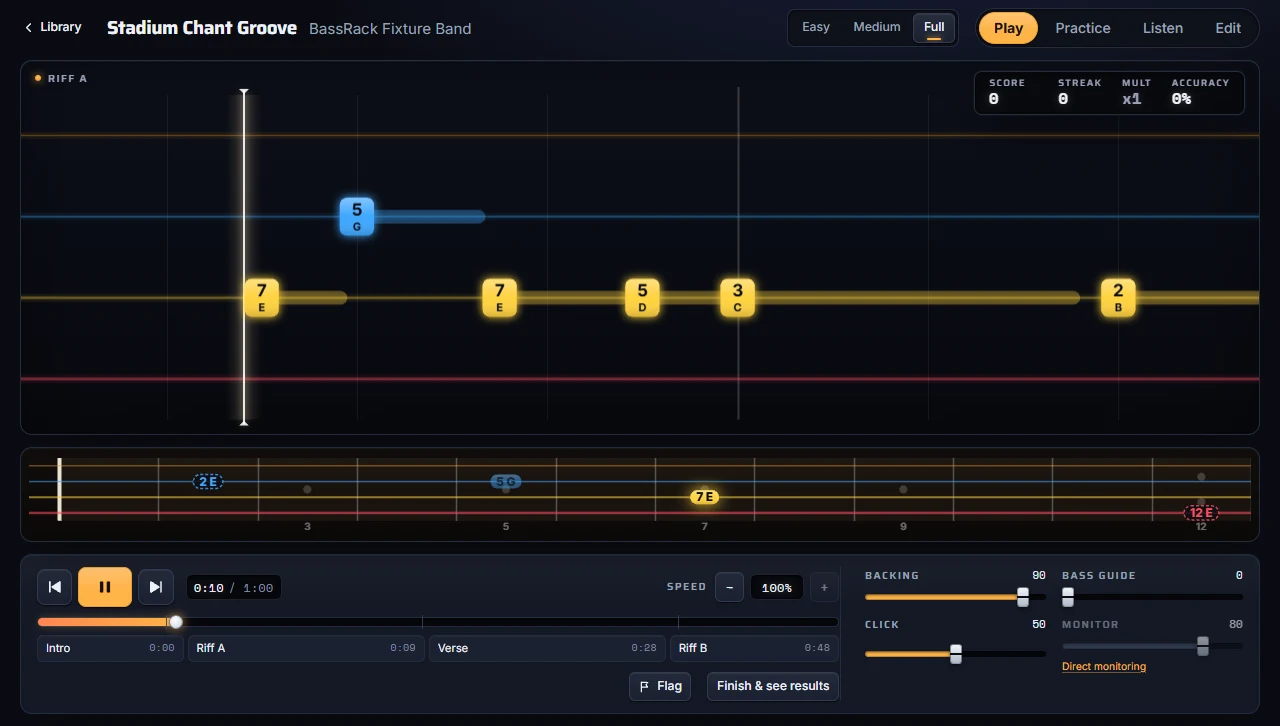
    Notes travel toward you on four lanes, one color per string, with fret numbers and optional note names. Pick Easy, Medium or Full.

  6. 06

    You play and get scored

    BassRack listens to your real bass while you play. Every note is scored Perfect, Good or Miss, with streaks, stars and personal bests.

Features

Built for practicing, not just watching

Import

A tuner and a tape deck

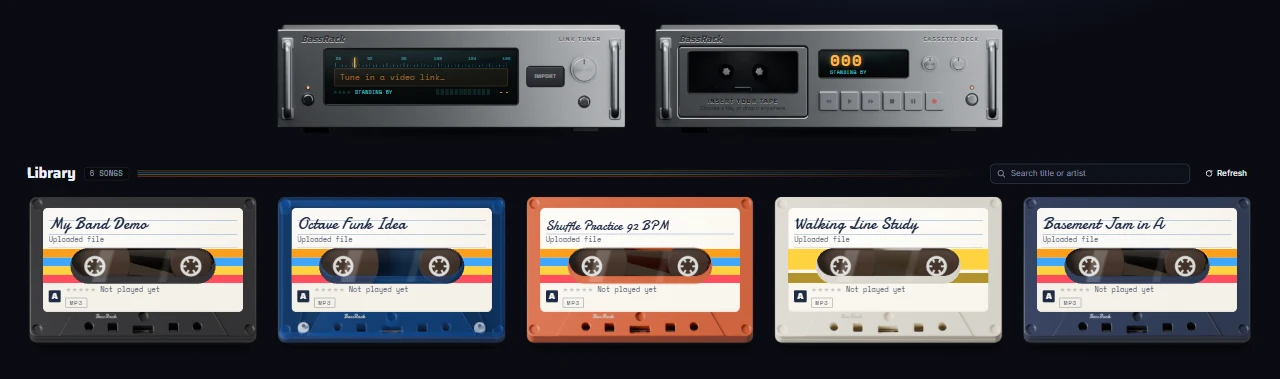
Songs come in through a hi-fi rack. Insert your tape: drop your own audio file into the cassette deck and watch the counter run while it is processed. The tuner takes a link from many sites whenever the free, optional tuner helper is running.

  • Cassette deck for your own files
  • Tuner for links, with the free optional helper, on every plan
The import rack: a link tuner and a cassette deck
Library

Your songs, as cassettes

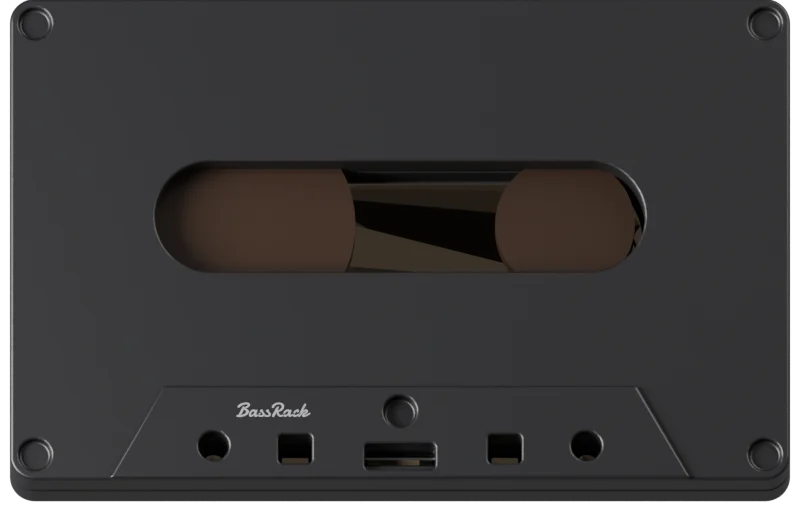
Every song becomes a cassette on a mixed shelf of colored and clear shells, with its cover, stars and personal best. Hover a cassette to hear a short preview of the song, then press Play, Practice or Listen.

  • Hover preview of every song
  • Search by title or artist
  • Edit the chart or change the cover from the menu
Song library: a shelf of cassettes in different colors under the import rack
Play

Highway and scoring

Every note is scored Perfect, Good or Miss, and timing stays fair at any speed, so slowing down is not cheating. Streaks raise a x1 to x4 multiplier, stars land at 50, 65, 80, 90 and 97% accuracy, and personal bests are kept per song, speed and level.

  • Play, Practice and Listen modes
  • Easy, Medium and Full levels
  • Fret numbers or note names
  • Four- and five-string basses, drop tunings
Play screen with the note highway, the fretboard strip and the transport
Loop

A–B loop, free on every plan

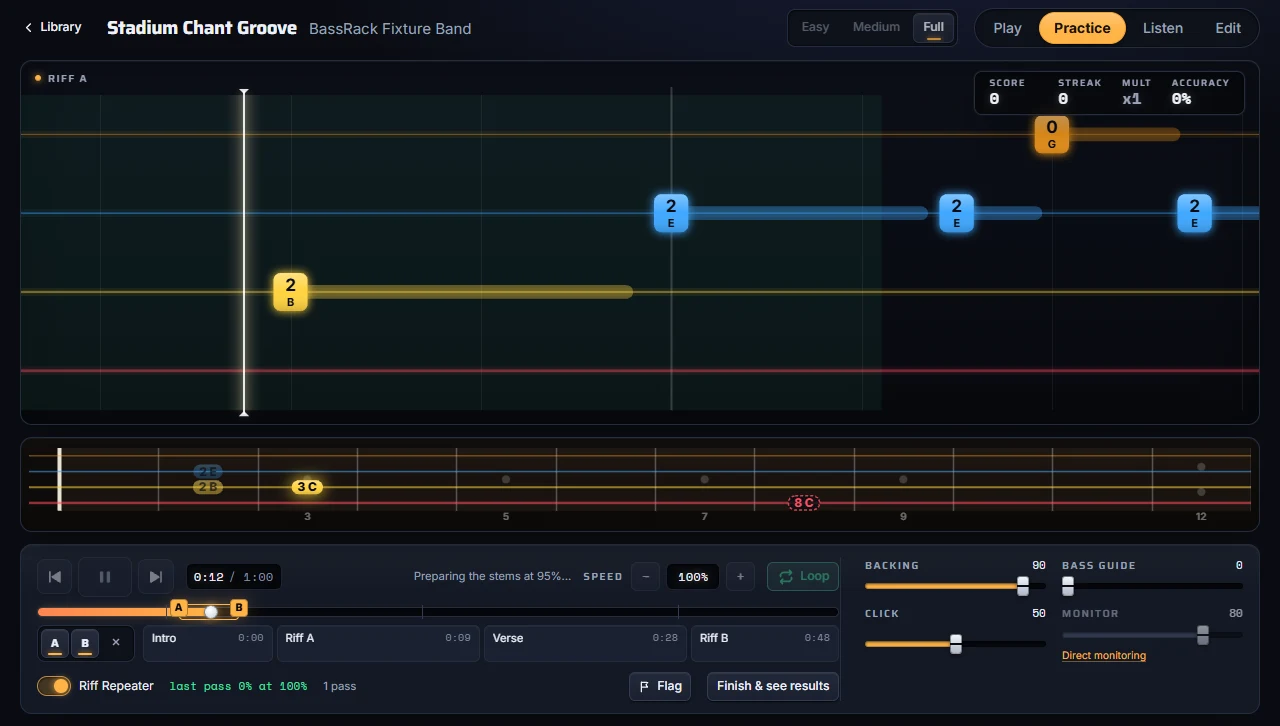
Set A and B anywhere in the song, or pick whole sections, and the passage repeats without a gap. Slow it down without changing the pitch, and let Riff Repeater speed it up by 5% after every 90% pass.

  • Set A and B with a click or the A and B keys
  • Gapless repeat, no count-in on every pass
  • Slow down without changing pitch
Practice mode with an A–B loop set on the timeline
Edit

Edit the chart, review highlighted notes

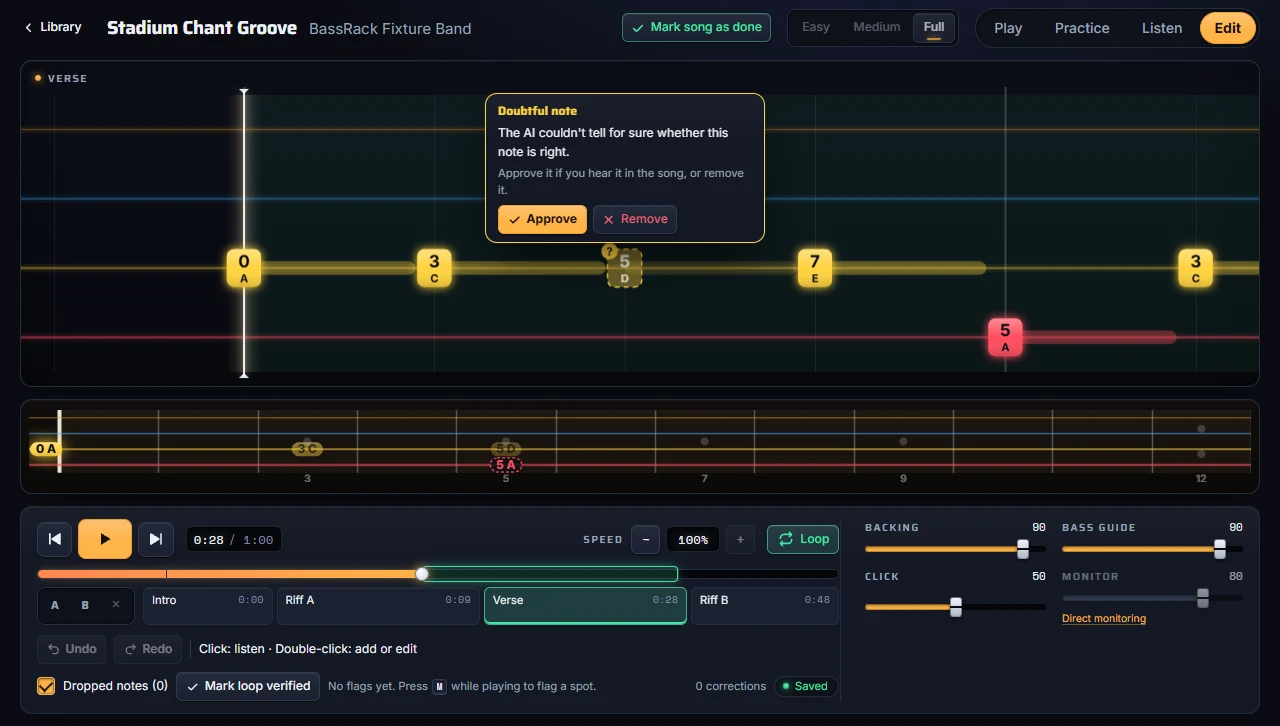
Fix any spot where the chart is wrong. Notes worth a check are highlighted: hover one to approve it if you hear it in the song, or remove it. Click to listen, double-click to add or edit, mark sections as verified. Your corrections are kept when a song is processed again.

  • Approve or remove each highlighted note
  • Undo and redo
  • Flag a spot while playing with M
Edit mode with the tip of a highlighted note offering Approve and Remove
Tab

Find a tab, paste it, aligned to the song

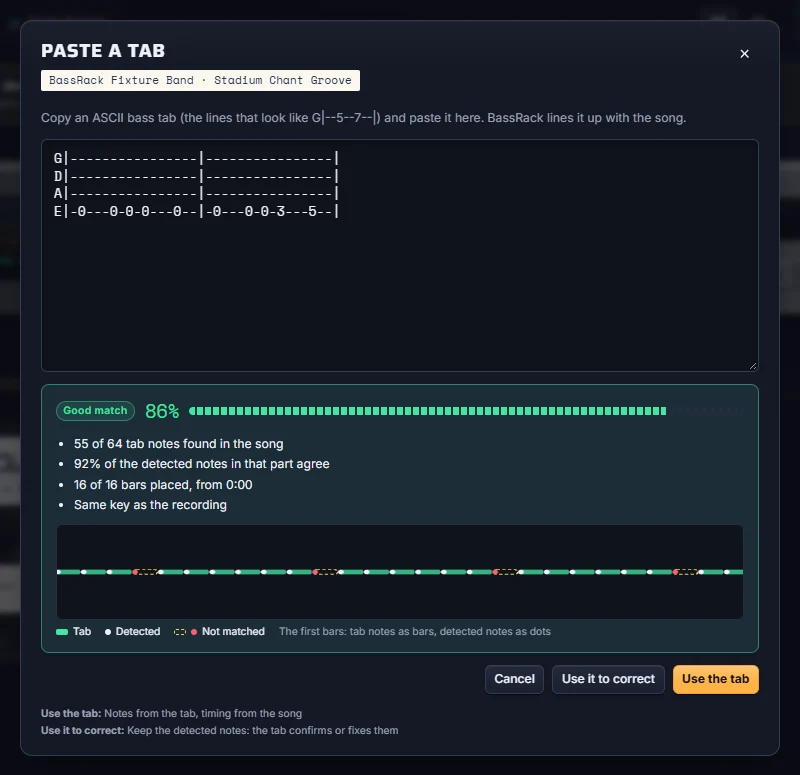
Open a tab site from the cassette menu, copy an ASCII bass tab and paste it. BassRack lines it up with the recording and shows how well it matches before you use it, either as the chart or to correct the detected notes.

  • Match report before you apply it
  • Use the tab, or use it to correct
  • Notes from the tab, timing from the song
The paste-a-tab dialog with a pasted bass tab and its match report
Rewards

Gold and holographic cassettes

Earn a gold foil label with a five-star best on a song. Play it perfectly, 100% at full speed on the Full level, and the cassette shell turns holographic. Each reward is celebrated once on the results screen.

  • Gold label: a five-star best
  • Holographic shell: a perfect run
Rig

Tuner, calibration and direct monitoring

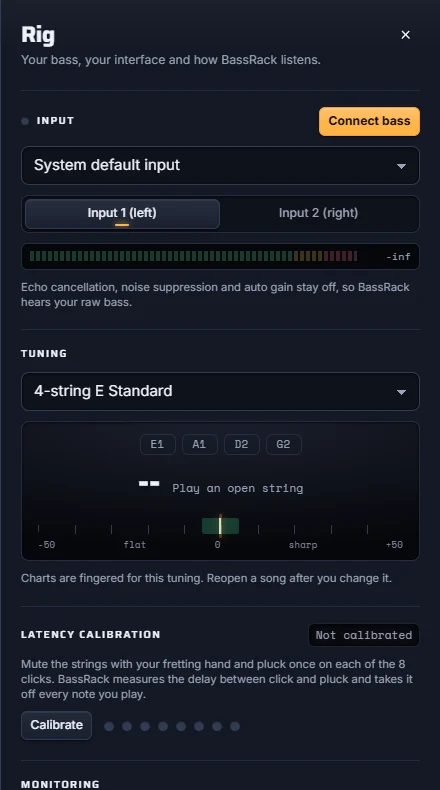
Pick your interface and input, check the level meter and tune up. A quick one-time latency calibration keeps scoring fair. Monitor yourself through your interface at zero latency, or use the optional software amp.

  • Built-in tuner
  • Latency calibration
  • Optional amp: drive, bass, mid, treble
Rig panel with input, tuner and latency calibration
Scale School

Scale School: a method book that plays back

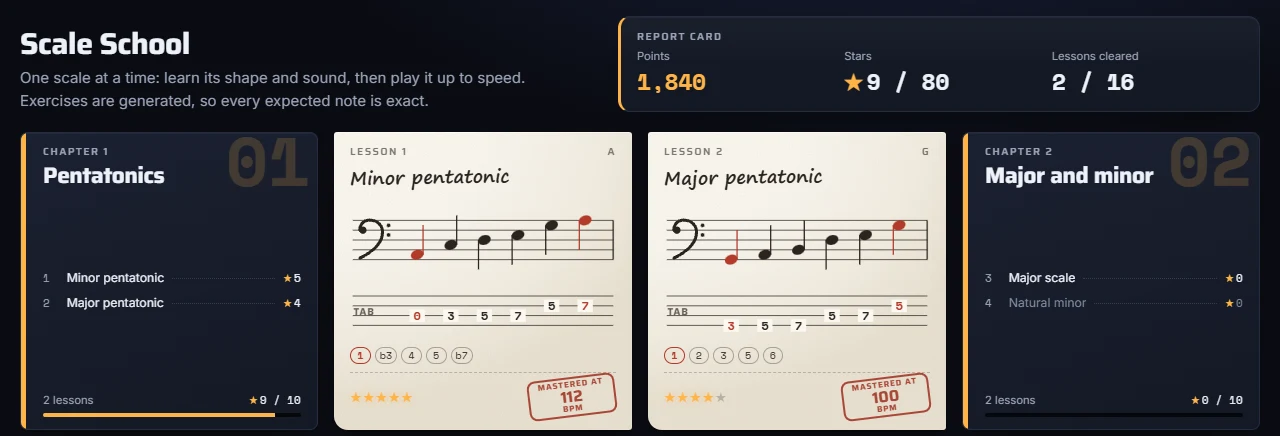
A path of scales instead of songs: pentatonics, major and minor, blues and the modes, written out like pages of a method book, in notation and tab. Every exercise is generated, so every expected note is exact.

The Scale School method book: chapter cards and lesson pages with notation, tab and mastery stamps

Method book

Chapters of lessons on sheet-music pages: the shape on the neck, the formula, how it sounds and a tip. The songs in your library that fit the scale are listed too.

A band behind you

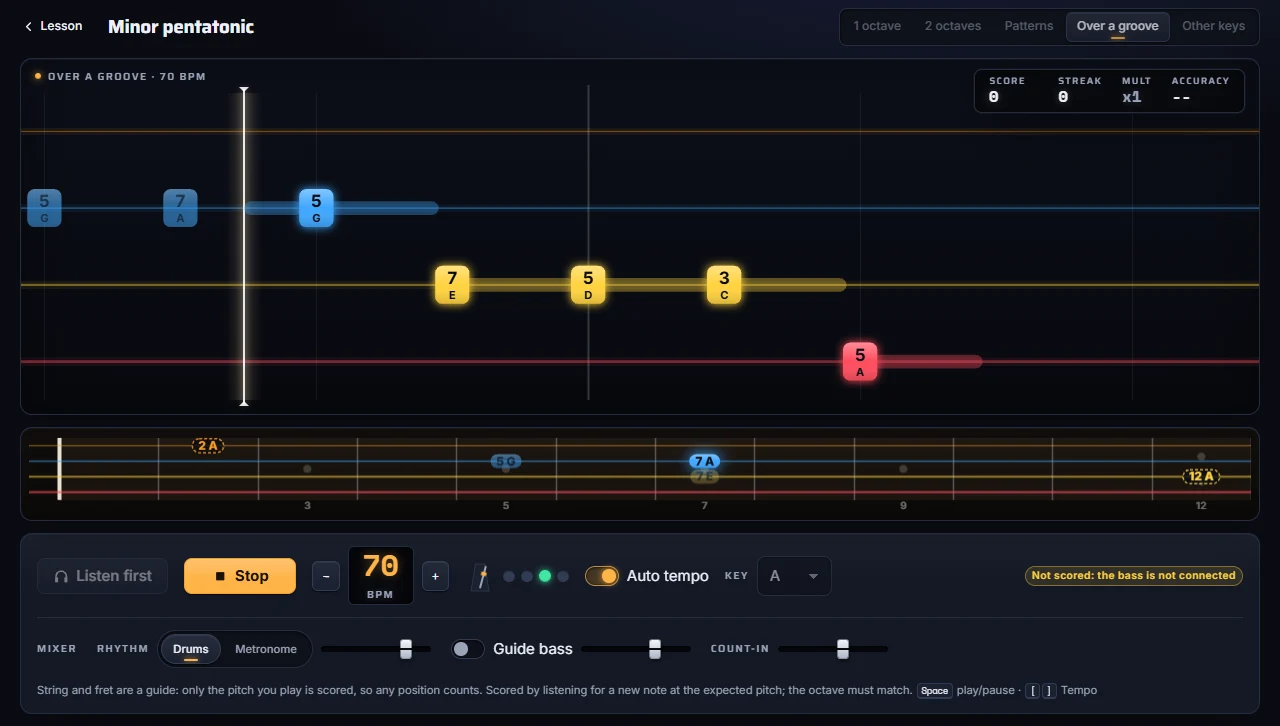
Practice over drums or a metronome, your choice. A guide bass can play the line first ("Listen first") so you hear it before you play it.

Tempo ramp

A big BPM display, a beat light and an audible count-in. With auto tempo on, the tempo rises when you nail a pass and drops when you miss.

Mastery stamps

Five stages per lesson, from one octave to other keys. Clear them and the page gets a teacher’s stamp with your best tempo; points add up on your report card.

A Scale School practice stage over a drum groove, with the BPM display and the mixer
No audio processing needed: every exercise is generated instantly in your browser.
Plans

Free to learn. Premium to go further.

The full app is free, with ads. Premium removes the ads; Premium Cloud also processes songs on our servers. Prices are in US dollars; Paddle handles taxes at checkout.

FeatureFreeEvery feature + the free tuner, with adsPremiumNo adsPremium CloudNo ads + processing on our servers
Highway, scoring, levels, A–B loop and Riff RepeaterIncludedIncludedIncluded
Scale SchoolIncludedIncludedIncluded
Upload your own files, processed on your deviceIncludedIncludedIncluded
Chart editor, note review and tab pasteIncludedIncludedIncluded
No adsNot includedIncludedIncluded
Free, optional tuner helper, if you want to practice songs from a linkIncludedIncludedIncluded
Processing on our servers, for devices that are too weakNot includedNot includedIncluded
PriceFree$3.99 / monthor $29.99/year (save 37%)$9.99 / monthor $79.99/year (save 33%)

No plan requires installing anything. The tuner helper is free and optional: install it only to practice songs from a link. Use only audio you own or have the right to use.

Premium Cloud: you upload the song from your device, as a file or with the tuner helper; our servers process it and then delete the audio. Your library stays on your device.

Prices in US dollars, worldwide. Paddle sells BassRack as the Merchant of Record and handles taxes at checkout. Full refund within 14 days of any payment.

Windows beta · free

How the tuner works

The BassRack Tuner is a free, optional desktop helper for anyone who wants to practice songs from a link, on any plan. BassRack runs in your browser without it, and uploading your own files never needs it.

Get the tuner (Windows beta)

042
Antenna up
  1. 1. Install the optional tuner

    On Windows, download the free beta from the tuner page (the Microsoft Store comes later); on macOS it will be a signed download. It lives as a small icon next to the clock or in the menu bar, with its status, "Open BassRack" and "Start with my computer".

  2. 2. Open BassRack in your browser

    The tuner’s antenna goes up whenever the helper is running, whatever your plan. The first time, your browser asks your permission to let BassRack talk to it.

  3. 3. Paste a link

    Paste a link from any supported site. The helper fetches the audio on your own computer, and the deck counter shows the progress. Use only audio you own or have the right to use.

  4. 4. A new cassette

    The song is processed on your device, or, with Premium Cloud, uploaded, processed on our servers and the audio deleted. The new cassette appears in your library.

Built to be safe

  • It only talks to bassrack.com in your browser, on your own computer, and never listens to the network.
  • It is paired with your browser: nothing else can use it.
  • It updates itself and checks the signature of every update before installing it.
Device check

Can my computer run BassRack?

Find out whether songs can be processed on this device and whether you can practice here. It runs only when you press the button, only reads what your browser already tells every page, and sends nothing anywhere.

Estimates from what the browser reports, not a speed test. Run it on the device and browser you will practice with.

Waitlist

Be the first to play along

BassRack is not open to everyone yet. Leave your email and we will write to you when it launches. One email, no spam.

Protected by Cloudflare Turnstile against spam bots.

FAQ

Questions

What is BassRack?

BassRack is a bass trainer that runs in your web browser. You bring a song, BassRack’s AI isolates the bass, turns the bass line into a playable note highway with string and fret numbers, and scores your real bass, note by note, while you play along. It also has a Scale School for practicing scales over drums or a metronome.

How much does BassRack cost?

The Free plan costs nothing: it includes every feature, the Scale School, the A–B loop, the chart editor and uploading your own files, with ads. It also includes the free, optional tuner helper for practicing songs from a link. Premium removes the ads. Premium Cloud removes the ads and adds processing on our servers for devices that are too weak. Premium costs $3.99 a month or $29.99 a year. Premium Cloud costs $9.99 a month or $79.99 a year and covers about 50 songs a month; your audio is deleted after processing. Prices are in US dollars, and Paddle handles taxes at checkout.

Do I have to install anything?

No. BassRack runs in your browser. The BassRack Tuner helper is free, optional and only for importing songs from a link; uploading your own files never needs it, and no plan requires it.

What is the BassRack Tuner?

A free, optional desktop helper for anyone who wants to practice songs from a link, on any plan. A Windows beta is on the tuner download page (the Microsoft Store comes later); macOS gets a signed download soon. It sits next to the clock or in the menu bar. When it runs, the tuner in BassRack raises its antenna: paste a link from any supported site, the helper fetches the audio on your own computer, and the song becomes a new cassette in your library. Use only audio you own or have the right to use.

Is the tuner safe?

It only talks to bassrack.com in your browser, on your own computer, and never listens to the network. It is paired with your browser the first time you use it, so nothing else can use it. It updates itself and checks the signature of every update before installing it.

Which basses, tunings and audio interfaces work?

Any electric bass and any audio interface with an instrument input, connected by cable. Four- and five-string basses are supported, in standard and drop tunings; charts are re-fingered instantly when you change the tuning. Pick the device and the input (1 or 2) in the Rig panel.

What do I need to connect my bass?

For the best results, plug your bass into your computer with a USB audio interface that has an instrument input (often labelled Hi-Z or Inst), or with a jack-to-USB instrument cable. A direct connection gives a clean signal, so every note is heard clearly. A microphone also works, but it picks up the room and the music around you.

Which devices can run BassRack?

Practicing needs a recent browser (Chromium-based or Firefox) with low-latency audio and an audio input. Processing songs on your own device needs a capable graphics card with WebGPU; on weaker computers, phones and tablets you can still practice everything, and Premium Cloud processes the songs on our servers. The device check on this page tells you what your computer can do. Check my device

Does my audio leave my device?

On the Free and Premium plans, no: your library, your songs, the separated tracks and your playing are processed and stored on your own device. With Premium Cloud, only the files you upload for processing are sent to our servers, and the audio is deleted after processing.

How is it different from learning from tabs?

A tab tells you which frets to play, but not exactly when, and it cannot hear you. BassRack shows every note in time with the real recording, listens to your bass and scores your timing and pitch, lets you slow down without changing pitch and loop any passage. If you have a tab you trust, paste it: BassRack aligns it to the song.

Which songs can I use?

Music you own or have the rights to use. Upload the audio file you have, or import from a link with the free, optional tuner helper, under the same rule: use only audio you own or have the right to use.

Does it work with every song?

Results depend on the recording. Clear, well-mixed bass lines work best. Techniques such as slap, ghost notes or chords may need a manual check, and you can review and edit any note in the chart editor.

Will I hear a delay when I play?

Not if you use direct monitoring on your audio interface: you hear your bass straight from the interface, with zero latency. Software monitoring is optional and adds a small delay. Run the latency calibration once per setup so scoring stays fair, and avoid Bluetooth headphones.

Do I need to read tab or notation?

No. The highway shows the string and fret of every note as it comes, and you can add note names. Start on Easy and move up when you are ready.